
Until now AyMON has run on Windows and on Linux servers. The same engine now runs on 64-bit ARM as well: a Raspberry Pi 5 with 64-bit Raspberry Pi OS (Bookworm or Trixie), or another arm64 Linux board. The current release carries it, and the repository has it beside the other two.
The same engine, the same rules
Nothing works differently on the Pi. The same XML configuration, the same live tree of connections, devices and points, the same alarms, history, scripts, web pages, MQTT and industrial protocols. A project written on a Windows laptop moves to the Pi unchanged, and every example in the repository starts there with the same command: ./run.sh picks the ARM engine by itself.
And the board’s own pins
On the Pi, AyMON also reaches the board’s own pins: inputs and interrupts, outputs, PWM, servos, pulse counters and encoders, I²C and SPI chips, an ultrasonic distance sensor, a temperature and humidity sensor, a keypad. Each one is a device and a point like a Modbus register, with the same alarms, history and pages. A chip that is a list of registers is described in XML alone; any other chip gets a short driver in script. There is nothing to install: the engine talks to the Linux kernel’s own interfaces.
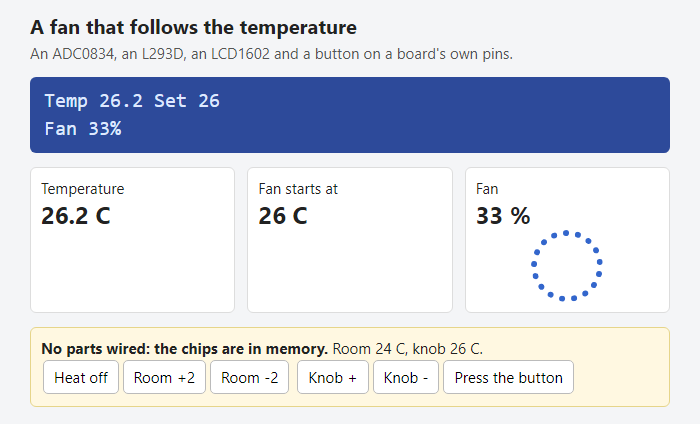
Three examples, no parts needed
The repository’s new board group has three projects, all on the FREE edition: a fan that follows the temperature, a door lock with a keypad, a card reader and a servo bolt, and a parking sensor whose beep quickens as an object comes nearer. Every chip can also be a chip in memory, so the three run on any machine — Windows included — with buttons on their page to change the little world around them. With the parts wired on a Pi, only the connection lines of the XML change.
More to come
The examples have run with their chips in memory, and the Pi’s lines have been measured on a Raspberry Pi 5. We are wiring the real parts now, and more board examples are on the way. If a real chip does not behave, the log names the device and the reason: please tell us.
- The repository — the engine, the examples and the guides
- Pins and buses — the guide to the board’s pins
- The current release — the Linux package holds both the x86-64 and the ARM engine
Raspberry Pi is a trademark of Raspberry Pi Ltd.